Key Takeaways
Cross-network in GA4 shows how users interact across multiple platforms
It is commonly tied to Performance Max and multi-channel campaigns
It helps you understand the full customer journey
Better insights lead to smarter budget allocation
It improves how you measure and optimize marketing performance
Understand Cross Network in GA4
Nearly every customer interacts with your business across multiple platforms before converting. They might find you through Google, return through an ad, and convert on another device.
This is where cross-network in GA4 becomes important.
What Is Cross Network in Google Analytics
Cross-network in Google Analytics 4 refers to tracking user activity across multiple channels, platforms, and devices. It gives you a clearer view of how users move through your marketing ecosystem.
Instead of seeing isolated sessions, you see a connected journey.
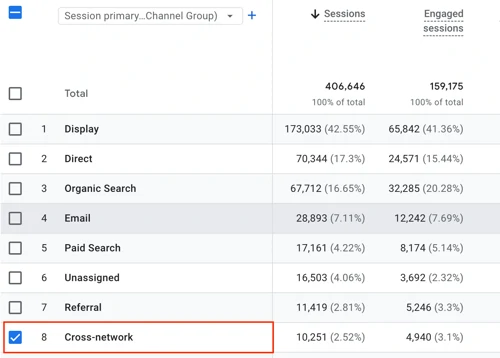
When people ask what is cross-network in Google Analytics, they are usually referring to how GA4 groups traffic from campaigns that span multiple Google properties, such as Performance Max campaigns.
What Is Cross Network in GA4
In GA4, cross-network is a default channel grouping. It typically includes traffic from campaigns that run across multiple Google networks.
These can include:
Search
Display
YouTube
Discovery
When GA4 cannot assign traffic to a single channel, it groups it under cross-network.
Why Cross Network Matters
Understanding GA4 cross-network data helps you see the full customer journey instead of isolated interactions.
This helps you:
Understand how users interact across channels
Identify which campaigns drive conversions
Improve attribution accuracy
Optimize budget across platforms
Without this view, you may undervalue certain campaigns.
When You Will See Cross Network Traffic
You will most often see cross-network traffic when running:
Performance Max campaigns
Multi-channel Google Ads campaigns
Campaigns that span multiple placements
This grouping prevents double-counting and gives a clearer overview of campaign performance.
How to Use Cross Network Data
To get the most value from cross-network data:
Review default channel grouping in GA4
Compare cross-network against other channels
Analyze conversion paths
Adjust campaigns based on full journey insights
This helps you move from guessing to data-driven decisions.